Help:UploadFile ESPEI
From EVOCD
- Login to Wiki
- Click on "upload file" link in the toolbox panel (the last box on the left side, just below search). The upload page will be dispalyed
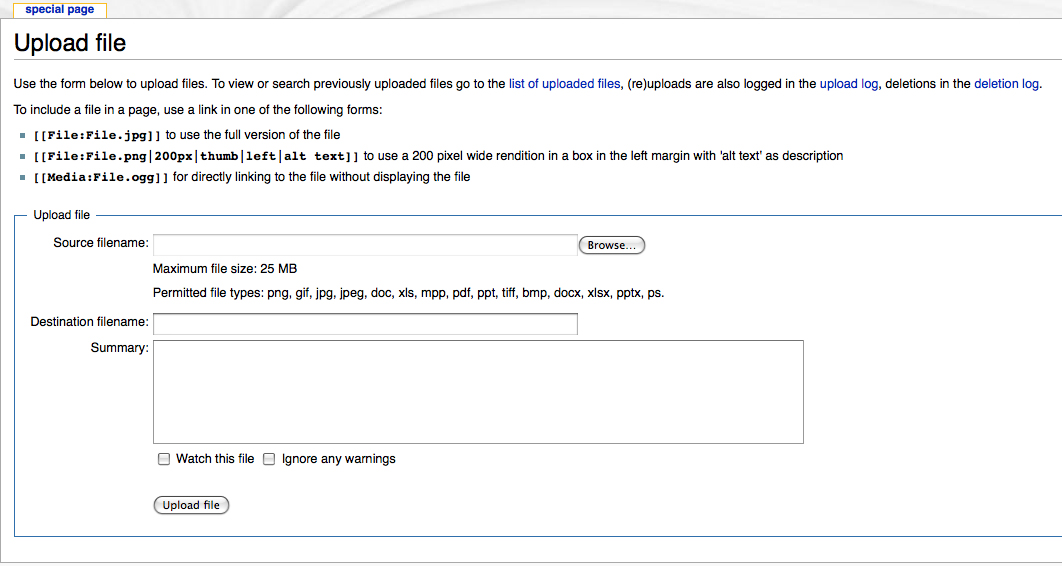
- Use the Browse... button to select the file to be uploaded
- Optionally, change the name of the file (please, make the name of the file meaningful)
- Optionally, type a short description
- Click Upload file button; a page confirming the successful upload will appear
- Return to the First Principles page (click on the First Principles link in the services box on the left)
- Click the edit link to the right of the User-Provided Data header
- Edit the table by adding two lines showed in red (and substitute "name_of_upladed_file, format, and your_name by the actual names)

{| cellspacing="10" style="border:1px solid black"
|-
! file name !!    format !! Author
|-
|[[Media:Zn.xls|Zn.xls]] || Excel || Chris Wolverton
|-
|[[Media:Mg-Al-Zn.xls|Mg-Al-Zn.xls]] || Excel || Chris Wolverton
|-

|[[Media:name_of_uploaded_file|name_of_uploaded_file]] || format || your_name
|-

|}
10. Click Save page button.
An alternative method: email your file to haupt@cavs.msstate.edu (Tomasz Haupt).
The contents of the file to be uploaded is not yet well defined. Use your expertise, common sense, and existing examples as a guidance. When in doubt, please contact dr.liu@psu.edu (Zi-Kui Liu). The preferable formats are Excel spreadsheets and plain text files.
